Category: Campaign Optimisations

  • How I Built Automated PPC Scripts That Boosted Sales by 90% in France

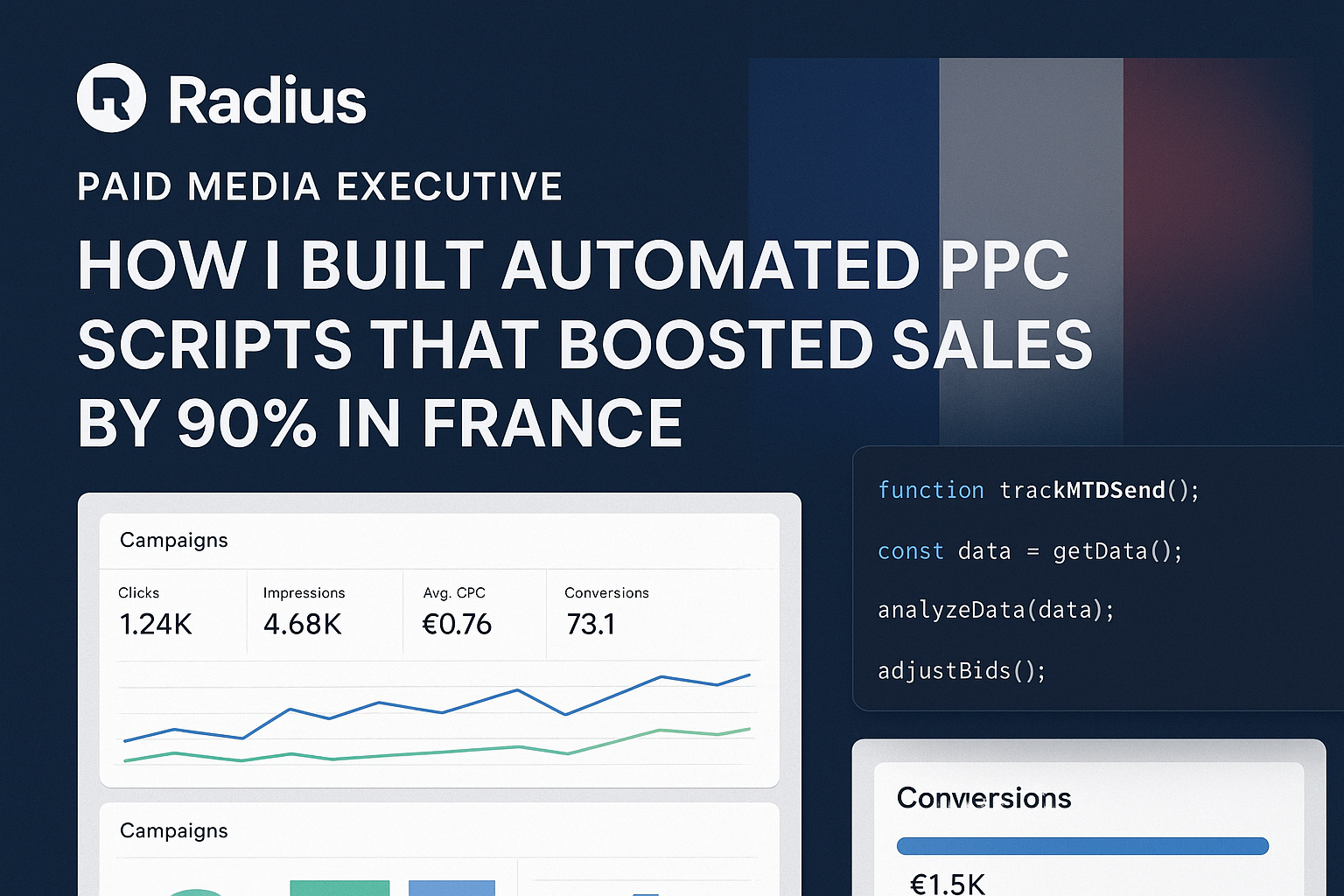
    How I Built Automated PPC Scripts That Boosted Sales by 90% in France

    Introduction

    I’m a Paid Media Executive managing international Google Ads campaigns across multiple European markets. As someone fluent in multiple languages and deeply passionate about digital marketing, I’ve always looked for ways to scale results without scaling workload.

    When I started managing complex campaigns at scale, I quickly realised one truth: manual campaign management was slow, inconsistent, and not scalable.

    I needed a smarter way to optimise campaigns, cut wasted spend, and surface insights faster. That’s when I started building custom Google Ads scripts and performance trackers.


    The Problem

    Before automation, my campaign workflow looked like this:

    • Hours spent pulling and cleaning reports from Google Ads and Google Analytics.
    • Inconsistent performance visibility across markets (France, Belgium, Germany, etc.).
    • Missed opportunities — campaigns couldn’t react in real-time to competitor activity or spend pacing.
    • Manual optimisations often came too late, especially when managing budgets across multiple regions.

    In short: I was spending more time on reporting than actually optimising campaigns.


    Scripts & Trackers

    The turning point came when I started building Google Ads automation scripts and custom performance trackers.

    Here’s what I developed:

    • Google Ads Automation Scripts
      • Automatically tracked spend pacing vs. budgets (daily & monthly).
      • Monitored conversion goals and flagged campaigns falling behind target.
      • Produced weekly, monthly, and market-level reports into Google Sheets — fully automated.
      • Included advanced features: impression share lost to budget, daily spend charts, and pacing alerts.
    • Custom Performance Trackers
      • Unified reporting across multiple countries in one consistent dashboard.
      • Allowed teams to see daily trends in spend, leads, and conversions at a glance.
      • Added benchmarking features (week-over-week, month-over-month, 180-day views).

    Why was this innovative?
    Because it wasn’t just automation — it was automation tailored to real market conditions. For example:

    • In France, competition from Verizon, Samsara, Quartix, Orange, and ExpertMarket meant our bids and budgets needed to adapt daily.
    • My trackers flagged when we were losing top position due to low bids, letting me react instantly instead of days later.

    The Results

    The impact was undeniable. With automation in place, campaigns became more agile and efficient.

    Here’s what happened in the French market:

    • Click-Through Rate (CTR): Improved consistently thanks to faster ad copy tests and SQR optimisations.
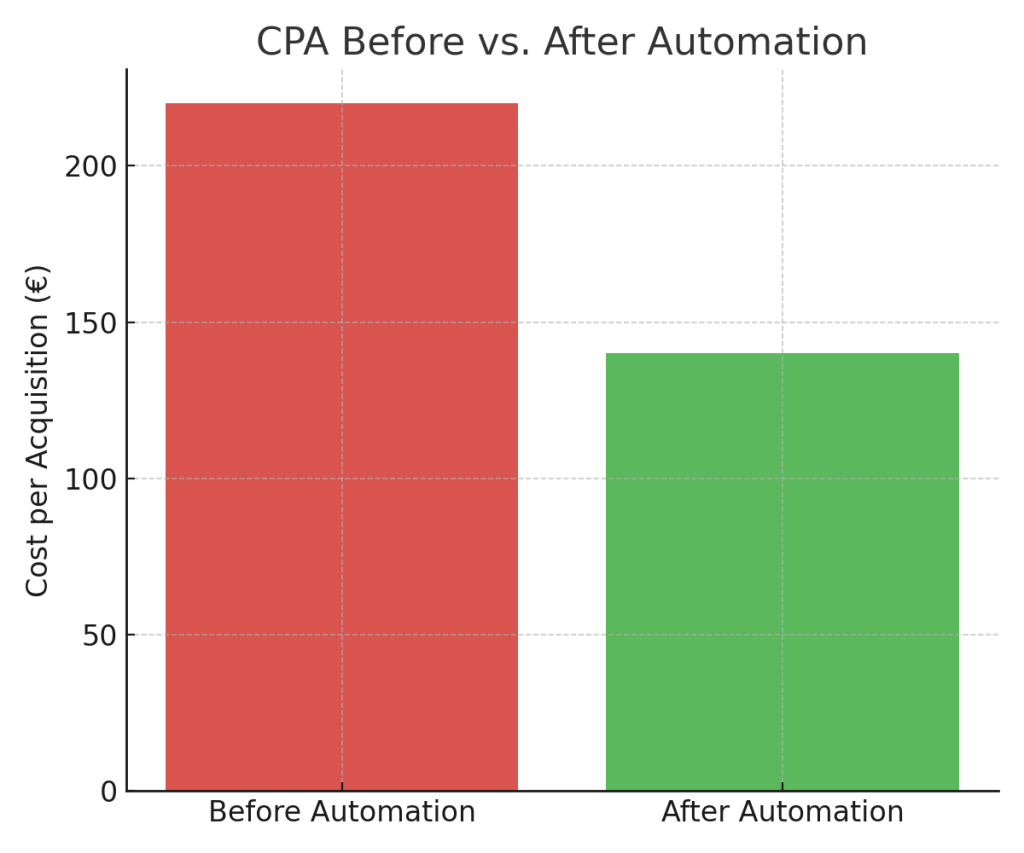
    • Cost Per Acquisition (CPA): Fell significantly due to automated pacing and waste reduction.
    • Sales Growth: Overall sales in France increased by +90% after automation rollout.

    What used to take hours of manual work was now happening in real-time, freeing me to focus on strategy and creativity.

    The Broader Impact

    These tools didn’t stay in one market.

    • Scripts were rolled out to Belgium, Germany, and Portugal, ensuring consistency across regions.
    • My colleagues adopted the trackers, which standardised reporting and saved time across the entire team.
    • By openly sharing my learnings, I’ve contributed to the wider PPC and AdTech community, showing how custom-built scripts can be game-changers in competitive markets.

    (Optionally, I plan to make anonymised versions of my scripts available for others to test and learn from.)

    Key Lessons Learned

    1. Automation is essential: In modern paid media, manual reporting is a bottleneck.
    2. Innovation changes workflows: Building custom tools doesn’t just boost results — it changes how teams work.
    3. Test, iterate, and share: The best scripts came from small experiments, refined through testing.

    My biggest takeaway: paid media success comes from combining creativity with technical innovation.


    Conclusion

    By building automated PPC scripts and trackers, I achieved something remarkable: 90% sales growth in France.

    But more importantly, I changed how campaigns were managed: faster, more scalable, and more effective.

    This is just the start. My mission is to continue pushing the boundaries of paid media innovation, and I’d love to share ideas with others working in this space.

    👉 If you’d like to discuss PPC automation, you can connect with me on LinkedIn or reach out directly.
  • Are Your Google Ads Wasting Money on Clicks You Already Own?

    Are Your Google Ads Wasting Money on Clicks You Already Own?

    Are Your Google Ads Wasting Money on Clicks You Already Own?
    You’re running a successful Google Ads campaign. The clicks are coming in, the conversions are tracking, and everything looks great on the surface. But what if a significant chunk of that budget—as much as 20% or more—is being spent on traffic you would have gotten for free anyway?

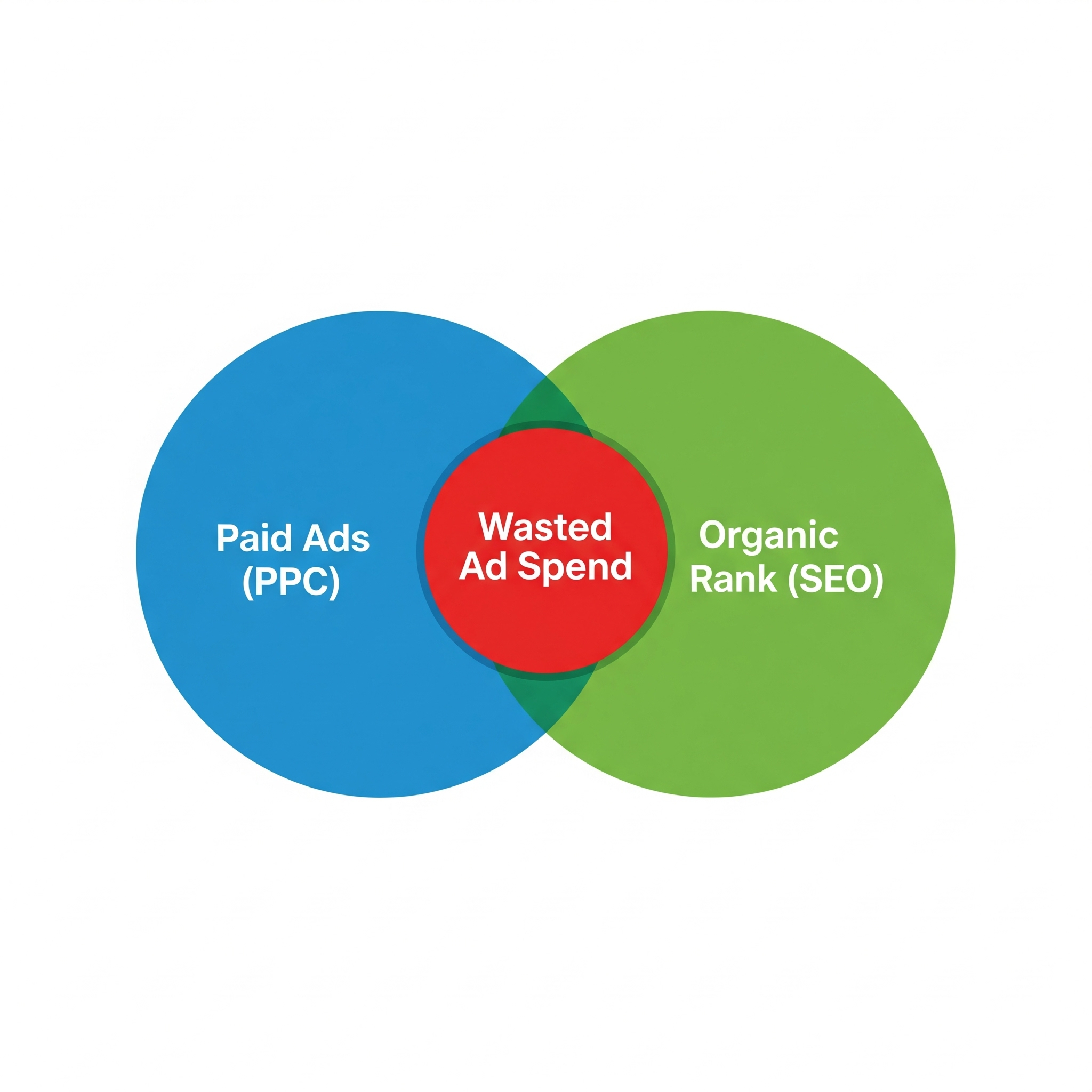
    It sounds counterintuitive, but it happens all the time. This hidden budget drain is called SEO and PPC overlap, and if you’re not actively looking for it, you’re almost certainly wasting money. It’s the digital equivalent of paying for advertising space right in front of your own shop window.

    The Hidden Cost of Success: What is SEO & PPC Overlap?

    SEO (Search Engine Optimisation) and PPC (Pay-Per-Click) are two sides of the same coin. SEO is the long-term effort to get your website ranking highly in the organic (free) search results. PPC, primarily through Google Ads, is the process of paying to appear at the top of the search results instantly.

    SEO & PPC overlap occurs when you pay for an ad click on a search query where your website already ranks in one of the top organic positions.

    Think about it: a user searches for your brand or a key service you offer. They see your paid ad at the top and click it. You pay for that click. But just below it, your website is sitting in the number one organic spot. Would they have clicked that free link if the ad wasn’t there? Very likely. That’s the budget you could be saving and reinvesting.

    Why You Can’t Afford to Ignore This Data

    Uncovering this overlap isn’t about blindly cutting your ad spend. It’s about making smarter, more strategic decisions with your marketing budget. By digging into the data, you can:

    • Identify Genuine Waste: Pinpoint high-cost keywords where you’re simply overpaying for traffic that your strong SEO performance would have captured for free.
    • Bid Smarter, Not Harder: Instead of paying a premium for every click, you can strategically lower your bids on terms where you have strong organic visibility, letting your SEO do the heavy lifting. This frees up budget for more competitive areas.
    • Achieve SERP Domination: Sometimes, owning both the top ad and the top organic result is a massive power move. It pushes competitors further down the page, builds immense brand credibility, and can significantly increase your total clicks. Knowing where this is happening allows you to double down intentionally, not accidentally.

    The problem is, Google doesn’t exactly hand you this report on a silver platter. The data exists, but it’s buried across different platforms.

    How to Find the Overlap: A Quick Guide

    You don’t need complex developer scripts to get started. While using the Google Ads API is an advanced option, anyone can begin to uncover this data with a bit of manual work.

    • Pull Your Google Ads Data: Go into your Google Ads account and run a “Search Terms” report for the last 30-60 days. You’ll want to export the data for Search Term, Clicks, Impressions, and CPC (Cost Per Click).
    • Pull Your Search Console Data: In Google Search Console, go to the “Performance” report. Set the same date range and export your “Queries” report, making sure you include Queries, Clicks, Impressions, and Average Position.
    • Combine and Analyse: Now for the important part. In a spreadsheet (using a VLOOKUP or similar function), combine these two reports by matching the “Search Term” from Ads with the “Query” from Search Console.

    You are looking for rows that show:

    A high CPC in your Ads report.

    An Average Organic Position of 1, 2, or 3 in your Search Console report.

    When you find these, you’ve found your overlap and a potential source of wasted budget.

    You Found It… Now What? Strategic Decisions

    Once you have the data, you can make informed choices:

    • For Branded Searches: If you rank #1 organically for your own brand name but are still paying a high CPC, you can confidently reduce your bids. Your customers are already looking for you.
    • For High-Intent Keywords: If a keyword is highly competitive and crucial for conversions, owning both the ad and the organic spot might be the best strategy for SERP domination. This is a deliberate choice, not an accident.
    • For Informational Keywords: If you rank highly for a “how-to” or informational query, you might decide to pull back on ad spend for that term, as the user is likely in a research phase and the organic result will serve them well.

    The Expert Solution: Stop Guessing, Start Optimising

    Let’s be honest—this process is time-consuming, and interpreting the data requires a deep understanding of both SEO and PPC. Making the wrong call could mean losing valuable traffic.

    This is where partnering with a specialist marketing agency is invaluable. At The Shift Labs, we live and breathe this data. We don’t just run siloed SEO or Google Ads campaigns; we create a unified strategy where every part works in harmony. We conduct these audits regularly to ensure your budget is being invested, not wasted.

    Instead of spending hours in spreadsheets, you can have a team of experts continuously optimising your accounts for maximum efficiency and growth.

    Ready to find out if your ad budget is working as hard as it should be? Visit Our Website to Book a call to learn more about our data-driven approach.

  • The New Google Ads Playbook: How to Succeed When Keywords Aren’t Enough

    The New Google Ads Playbook: How to Succeed When Keywords Aren’t Enough

    If you’ve been managing Google Ads campaigns for a few years, you’ve witnessed a dramatic shift. We used to live in a world governed by keywords. Exact match meant what it said, every search query was visible, and campaign success was often built inside a spreadsheet.

    That era is over. While it’s easy to be nostalgic for the old days of granular control, the platform has evolved. To succeed today, our strategies must evolve too.

    Keywords Are Now Suggestions, Not Commands
    Think of a keyword today as a hint you give to Google’s powerful algorithm, not a strict rule. It’s a starting point that the system can use, expand upon, or even disregard in favour of other signals.

    This is why a broad match keyword can trigger your ad on a tangentially related search, or why even your most carefully selected audience signals can feel like they’re being ignored by a Performance Max campaign.

    This change can be frustrating. Marketers often feel they have less direct control and transparency than ever before. But this shift doesn’t mean the tools are broken. In fact, those who adapt to this new reality are finding opportunities that their competitors, stuck in an old way of thinking, are missing entirely.

    The key is to move from a keyword-centric mindset to one that embraces audience signals and user intent. Keywords are now just one part of a much larger, more dynamic targeting system.

    The Four Pillars of Modern Audience Targeting


    In today’s Google Ads, effective audience targeting isn’t just a “nice to have”; it’s the core of a successful campaign. With keywords becoming more abstract, audiences provide the necessary direction and focus. A robust strategy is typically built on four pillars: leveraging Google’s data, using your own data, building custom segments, and embracing automation.

    Let’s explore the first two, which form the foundation of any modern targeting approach.

    Using Google’s Built-in Audience Segments

    Google provides a vast library of ready-made audiences built from its extensive user data. These are simple to activate and offer significant scale.

    • Detailed Demographics: Move beyond the basics. You can target users based on life details like parental status, level of education, or homeownership.
    • Affinity Segments: These segments group users by their long-term passions and hobbies. Whether your target market is into classic films, sustainable living, or marathon running, there is likely an affinity segment available.
    • In-Market Segments: Perhaps the most valuable for direct response, these audiences contain users who are actively researching and close to making a purchase in a specific category.
    • Life Events: Target individuals going through significant life changes, such as starting a new business, retiring, or recently moving. These moments often create new needs and purchase behaviours.

    Leveraging Your Own First-Party Data

    As the digital world moves away from third-party cookies, your own data becomes your most valuable asset. These audiences, built from your direct interactions with customers, are incredibly powerful.

    • Website Visitors: This is classic remarketing. You can create lists of users who visited specific pages, watched a video, or abandoned a shopping cart. These are easily created through tools like Google Tag Manager or GA4.
    • App Users: If you have a mobile app, you can segment your audience based on their in-app behaviour, such as free vs. premium users or those who have completed a key action.
    • Customer Lists: By securely uploading data from your CRM (like email addresses), you can directly target existing customers. This is highly effective for upselling, creating lookalike audiences, or excluding them from top-of-funnel campaigns.
    • Google Content Engagers: This is a fantastic tool, especially for newer businesses. Google can automatically create an audience of people who have interacted with your brand on any Google property (including Search, Maps, or YouTube). Best of all, it works without needing any tracking tags on your site.

    Remember, these lists are just as powerful for exclusions. You can prevent wasting ad spend by excluding your employees, existing customers, or known low-value leads.

    Building Custom Segments for Pinpoint Accuracy


    When pre-defined audiences don’t fit your needs, custom segments allow you to build your own with precision. Here, you define your audience based on their actual online behaviours.

    You can create a custom segment using a combination of signals:

    • Specific terms they have searched for on Google.
    • Their general browsing interests and patterns.
    • The specific types of websites they frequent.
    • The kinds of mobile apps they have installed.

    This allows you to capture user intent that standard keywords might miss. For instance, a company selling high-quality home coffee brewing equipment could build a custom segment of users who search for “single-origin coffee beans,” visit popular coffee blogs, and use café discovery apps.

    These segments are especially powerful in Display, Video, and Demand Gen campaigns, where context and user interest are paramount.

    The Foundational Mistake: A Vague Offer and Audience


    Before a single penny is spent on ads, many campaigns are already set up to fail. The most common reason? The advertiser hasn’t taken the time to clearly and specifically define what they are selling and who they are selling it to.

    It sounds elementary, but it’s an oversight that happens all the time.

    • What is your specific offer?
      Don’t think in broad categories. You don’t sell “project management software”; you sell “project management software for small creative agencies.” You don’t offer “building services”; you offer “specialist historical building restoration in the Cotswolds.” Clarity is power.
    • Who is your specific audience?
      Understand their context and motivation. An in-house marketing manager at a large corporation has very different needs and pain points than a freelance designer, even if they use similar search terms.

    Once you have defined these distinct audience profiles, each one deserves its own tailored campaign with unique targeting, creative, and messaging. Trying to appeal to everyone with a single, generic ad is a recipe for poor performance.

    Thinking Laterally: Reaching Niche Audiences Creatively


    What happens when you can’t target your ideal customer directly? This is a common challenge for those in niche markets or sensitive categories where direct targeting options are restricted.

    The solution is to think laterally. Instead of trying for a direct match, ask yourself: what are the proxy signals for my audience? What else do they do, read, or buy? What are their overlapping interests?

    Imagine you’re marketing a new line of premium, eco-friendly baby products. You can’t directly target “new parents who care about sustainability.” So, you think sideways:

    You target people with an affinity for sustainable fashion brands.

    You create a custom segment of users who visit websites about organic living and non-toxic home products.

    You layer in targeting for users of baby milestone tracking apps.

    This approach is both smart and effective. It becomes even more potent when your ad creative acts as a final filter. An ad that prominently features sustainable materials and eco-certifications will naturally attract the right audience and cause the wrong audience to scroll by, further refining your targeting without any extra cost.

    Final Thoughts


    As Google’s platforms become more automated and keyword precision fades, your ability to strategically target audiences is your greatest advantage.

    The goal is not to fight the machine, but to feed it better information. When you define your offer, understand your audience, and use creative targeting strategies, you provide the clear signals the algorithm needs to find your customers. In today’s advertising landscape, the clarity of your input determines the quality of your output.

  • How to Blueprint Landing Pages That Google Loves + My tool for optimising landing pages

    How to Blueprint Landing Pages That Google Loves + My tool for optimising landing pages

    Are you spending a fortune on Google Ads only to be penalized by a low Quality Score? It’s a common frustration. You have a great product, compelling ads, but your costs keep climbing while your ad position stays stubbornly low. The culprit is often a single, overlooked element: a one-size-fits-all landing page.

    Sending traffic from highly specific ads to a generic homepage is like inviting a guest for a steak dinner and then telling them to find the steak somewhere in your crowded pantry. It’s a poor experience that kills conversions and tells Google your page isn’t relevant.

    The solution is to create a strategic plan—a blueprint—for a unique landing page for each of your ad groups. Using the structure from a Quality Score optimization tool, we’ll break down how you can plan these pages to maximize relevance and boost your Google Ads performance.
    How to Create Your Landing Page Blueprint

    The provided HTML file is a perfect example of a report that blueprints custom landing pages for different ad groups. Let’s use its structure to create our own plan. The core idea is to segment your strategy based on the user intent and commercial value of each ad group.

    The example report breaks down ad groups by their Cost Per Lead (CPL), from low to very high. This is an excellent way to prioritize your efforts.

    Step 1: Segment Ad Groups and Define Their Goal

    First, categorize your ad groups. Don’t just group them by keywords; group them by the audience they target. The example file identifies four distinct types:

    • High CPL (e.g., “Cœur de Flotte B2B”): This is your core, high-intent audience. They are searching for a direct solution and are valuable leads. The landing page goal is to build trust and prove ROI.
    • Medium CPL (e.g., “Niches Actifs & Chantier”): This group targets a specific industry (construction). They have unique needs. The goal is to speak their language and show them you understand their specific problems.
    • Low CPL (e.g., “Opportunités Rentables”): This group is price-sensitive. They are looking for an affordable, straightforward solution. The goal is to highlight value and simplicity.
    • Very High CPL (e.g., “Trafic Large à Qualifier”): This group comes from broad keywords that attract irrelevant traffic (e.g., B2C users for a B2B product). The landing page’s primary goal is to disqualify the wrong audience quickly to avoid wasted ad spend.

    Step 2: List Unique Selling Propositions (USPs) for Each Segment

    For each ad group, what are the 3-4 most important benefits for that specific audience? Don’t use generic company-wide benefits.

    • For the High CPL “B2B Fleet” group, the USPs are about business results: Optimisation des Trajets & Carburant, Rapports de Performance Détaillés, and Augmentation de la Productivité.
    • For the Low CPL “Affordable” group, the USPs are completely different, focusing on accessibility: Solution Complète et Abordable dès 8€, Installation Facile et Rapide, and Pas de Frais Cachés.

    This exercise forces you to align your page’s messaging with the user’s core motivation.

    Step 3: Blueprint the Page Sections

    Now, outline the specific sections for each landing page. This is your architectural plan.

    Blueprint for a High-Intent “B2B Fleet” Page:

    1. Immersive Hero Section: Start with a headline that directly matches the ad group’s keywords. (e.g., H1: “High-Performance Business Fleet Management Solution”). The Call-to-Action (CTA) should be high-commitment, like “Request a Custom Quote.”
    2. Challenges & Solutions Section: Address their specific pain points (fuel costs, lack of visibility) and position your product as the solution.
    3. ROI Focus: Detail 3 key features that directly impact their bottom line, like route planning or eco-driving analytics.
    4. Social Proof: Use logos and testimonials from similar companies to build credibility for a high-value decision.
    5. Final CTA: A clear contact block to close the deal.

    Blueprint for a “Disqualifying” Page (for broad traffic):

    This is a brilliant and often underutilized strategy shown in the report. The goal isn’t just to convert; it’s to repel the wrong people.

    1. “Filtering” Hero Section: Use a headline that is hyper-specific and acts as a warning. (e.g., H1: “Geolocation System for Company Vehicles“). The subtitle should be even clearer: “Attention: Our solution is exclusively for professionals (fleets, artisans, etc.).”
    2. “Are You in the Right Place?” Section: This is genius. Use a two-column layout. One side has green checkmarks for your target audience (“For Pros: fleet tracking, tax optimization”). The other has red X’s for the audience you want to exclude (“Not for Individuals: tracking a personal stolen car”).
    3. Business-Only Benefits: Focus entirely on benefits that a private individual wouldn’t care about, such as VAT recovery or employee time tracking.
    4. Qualifying Contact Form: Make fields like “Company Name” and “Business ID Number” mandatory to filter out non-professional inquiries.

    The Result: A Higher Quality Score and Better ROI:

    By following this blueprinting process, you directly improve your Google Ads metrics.

    • Improved Ad Relevance: Your landing page headline, USPs, and content are now perfectly aligned with your keywords and ad copy.
    • Enhanced Landing Page Experience: You are meeting user expectations head-on, answering their specific questions, and guiding them logically toward a relevant conversion action. Google rewards this with a higher score.
    • Higher Conversion Rates: A page that speaks directly to a user’s needs will always convert better than a generic one. This increase in conversion rate is a strong positive signal to Google, further reinforcing your page’s quality.

    Stop treating your landing page as an afterthought. Use this blueprinting method to plan your sections strategically, and you’ll provide a better user experience that Google’s algorithm can’t help but reward.

    To help you organize your landing pages more effectively, I’m sharing an HTML/CSS template that allows you to create mockups for headlines, descriptions, and CTAs. It’s a great way to structure your content before building the actual landing page. Additionally, the tool can scan your mockups to check whether you’re using your targeted keywords appropriately.